
How to Protect an EXE from Cracking and Reverse Engineering
What Attackers Actually Do
Before you can defend your software, you need to understand how it gets attacked. Cracking a Windows executable typically follows a predictable sequence.
Step 1: Static analysis. The attacker loads your EXE into a disassembler like IDA Pro or Ghidra. They look at the import table to see which Windows APIs you call, browse through strings to find error messages and UI text, and identify interesting functions by their structure and cross-references.
Step 2: Dynamic analysis. They run your program under a debugger like x64dbg. They set breakpoints on suspicious functions -- especially anything related to licensing, registration, or feature gating. They watch the arguments and return values to understand the control flow.
Step 3: Identify the check. Somewhere in your code, there is a branch: the user is licensed, or they are not. The attacker's goal is to find this branch. It might be a single jne instruction after a license validation function, a comparison against a stored hash, or a call to an external licensing server.
Step 4: Patch. Once found, the fix is often trivial. Change jne (jump if not equal) to je (jump if equal), or replace the comparison with a nop sled, or force the validation function to always return true. Save the modified binary. Done.
The entire process can take minutes for an unprotected binary. Here is how to make it take much, much longer.
Strategy 1: Destroy the Import Table
Your executable's Import Address Table (IAT) is a roadmap for attackers. It lists every DLL and every function your program calls. An attacker sees CreateFileW, RegQueryValueExW, InternetOpenUrlA and immediately knows what your code is doing in each section.
Defense: IAT destruction. Replace IAT entries with a custom resolution mechanism. Instead of the loader filling in function addresses at startup, your protected binary resolves imports through an obfuscated runtime layer. When an attacker opens the binary in IDA, the import table is empty or filled with garbage. Cross-references to API calls vanish.
ChaosProtector's import-protection feature replaces selected static import metadata with runtime resolution. This is intended to reduce useful API names and cross-references during static analysis. It does not hide runtime behavior completely: resolved addresses and calls can still be observed by a sufficiently capable analyst.
Strategy 2: Defeat Static Disassembly
Modern disassemblers are sophisticated, but they rely on assumptions about how code is structured. x86-64 is a variable-length instruction set, and disassemblers must decide where each instruction starts and ends. This creates an opportunity.
Defense: Anti-disassembly. Insert carefully crafted byte sequences that cause disassemblers to misinterpret instruction boundaries. The CPU executes the code correctly because it follows the actual control flow, but a linear or recursive disassembler gets confused, producing garbage output for surrounding functions.
Common techniques include:
- Opaque predicates: Conditional jumps that always go one way but appear to be a real branch. The disassembler follows both paths, and the fake path contains misaligned instructions that corrupt the output.
- Jump-into-instruction: A jump targets the middle of another instruction, which decodes differently depending on the starting offset.
- Dead code insertion: Unreachable bytes that look like valid instruction prefixes, causing the disassembler to misparse subsequent real instructions.
ChaosProtector can apply anti-disassembly transformations to make automated output less reliable, including around functions that are not virtualized. Results vary by binary and analysis-tool version, so inspect the protected build with the same tools you use in your security regression tests.
Strategy 3: Prevent Debugging
When static analysis fails, attackers turn to debuggers. A running program cannot hide its behavior from a debugger that can set breakpoints and inspect memory -- unless you actively detect and resist debugging.
Defense: Anti-debug techniques. There are many approaches, and layering multiple techniques is important because each individual check has known bypasses:
- API-based detection: Calls to
IsDebuggerPresent,NtQueryInformationProcess, orCheckRemoteDebuggerPresentdetect attached debuggers. - Timing checks: Measure execution time between two points. Stepping through code in a debugger introduces millisecond-scale delays that normal execution does not have.
- Hardware breakpoint detection: Read the debug registers (DR0-DR7) to detect hardware breakpoints. If any are set and you did not set them, a debugger is present.
- Self-integrity checks: Hash your own code sections at runtime. If a software breakpoint (
0xCC/int 3) has been inserted, the hash will not match.
No single anti-debug technique is unbreakable, but stacking multiple checks across different parts of your code forces an attacker to find and bypass all of them.
Strategy 4: Virtualize Critical Functions
Code virtualization is a high-resistance layer for selected functions. It converts native x86 or x86-64 instructions into custom bytecode executed by an embedded interpreter. The original instruction sequence is no longer directly available as a normal native function, although the bytecode, interpreter, and runtime state can still be studied.
Defense: Selective virtualization. Identify the functions that matter most:
- License validation and registration logic
- Feature-gating checks
- Cryptographic routines and key derivation
- Anti-tamper verification functions
- Proprietary algorithms that represent your competitive advantage
Virtualize these specifically. The rest of your code can remain native for performance. A well-designed VM can raise analysis cost significantly, but the outcome depends on the implementation, the size of the selected function, and how much surrounding code reveals.
For a deeper explanation, read how code virtualization works. If you are comparing commercial implementations, see the neutral VMProtect vs Themida vs ChaosProtector comparison.
Strategy 5: Protect the Protector
A common attack against protected binaries targets the protection layer itself. If an attacker can reverse engineer the VM interpreter, they can build a devirtualizer that undoes the protection automatically.
Defense: Self-protection. The protection tool should apply its own techniques to the VM interpreter and runtime stubs it injects into your binary. ChaosProtector's self-protection feature virtualizes and obfuscates its own runtime components, so the interpreter itself resists analysis.
Putting It All Together
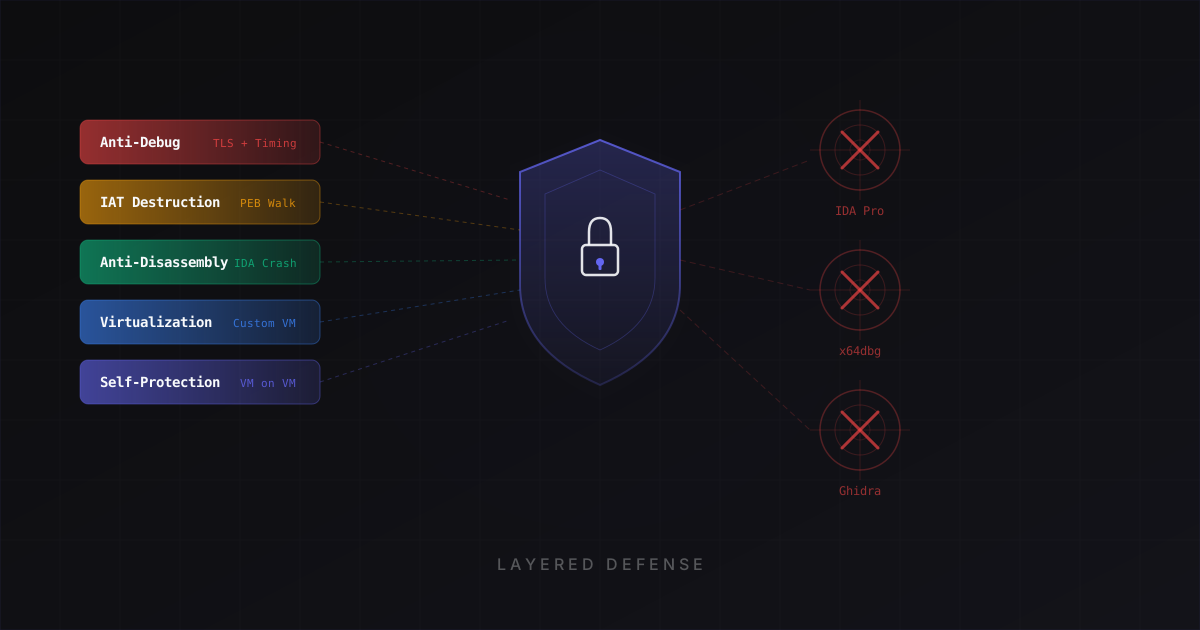
No single technique provides complete protection. The goal is layered defense that forces an attacker to solve multiple hard problems simultaneously:
- Import protection reduces the API metadata available for initial static analysis
- Anti-disassembly is intended to make automated static output less reliable
- Anti-debug adds detection and resistance around common dynamic-analysis workflows
- Code virtualization replaces selected native functions with a less familiar execution model
- Self-protection raises the effort required to study the injected runtime itself
Each layer can increase the time and effort required, but protection strength cannot be expressed as a guaranteed number of days or months. Validate the result against a documented threat model and keep decisive authorization checks and secrets on a server whenever possible.
Practical Steps With ChaosProtector
- Load your compiled x86 or x86-64 EXE or DLL into ChaosProtector
- Browse the function list and select the critical functions to virtualize
- Enable IAT destruction, anti-disassembly, and self-protection in the settings
- Run the protection pass
- Test the output binary thoroughly -- verify all functionality works correctly
- If the input references a PDB, preserve the copied sidecar for crash analysis; ChaosProtector does not reconstruct missing or virtualized symbols
Protection is not a one-time task. As you release updates, re-apply protection to each new build. Automate the process in your CI pipeline where possible, and always test the protected output before shipping to users.
Use the Free plan to validate the workflow on a copy of your release binary, and review the CLI documentation if the protection step needs to run in CI. When the protected build passes functional, performance, signing, and antivirus checks, compare the paid plans for virtualization and advanced layers.
Ready to protect your software?
Download ChaosProtector for free and start protecting your binaries in minutes.
Download Free